Construction inspection software
Construction inspection software that will not accept an unproven submission
RTI is construction inspection software built on one rule: a crew’s inspection cannot be submitted until its required items are answered and its required photos are attached, checked on the server. Every inspection point carries a QR tag, every submission lands on one review board, and approved work becomes the turnover package.
- A QR tag on every inspection point
- Photo Gate checked on the server
- Turnover package from approved work
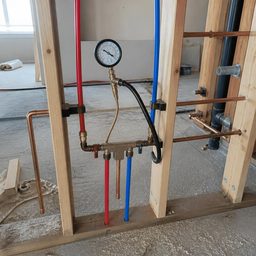
- Supply lines pressure tested Pass
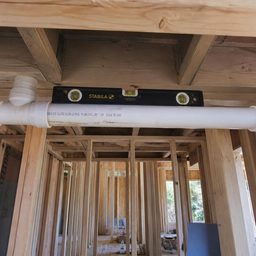
- Drain slope verified Pass
Where inspection software usually lets the evidence slip
A checkmark, not proof
The form submits whether or not the photos are there, so the reviewer takes the crew’s word for it.
A record anyone can edit
The signed-off inspection lives in a file that can change after the fact, so it settles nothing in a dispute.
Turnover rebuilt by hand
The last weeks of the job go into pulling photos out of text threads to assemble the package.
With RTI
- No photos, no submission
- Approvals sealed and chained
- The package builds from approvals
RTI checks the evidence on the server when the inspection is submitted, so the rule holds whatever device sends it.
From the tag on the wall to the approved record
Scan the tag
A crew scans the QR tag on the inspection point, sees the checklist assigned to it, and starts the inspection with one tap.
Capture on the phone
The crew answers each item and takes the photos it asks for, each stamped with the tag number and the time. With no signal, the finished inspection and its photos wait in a queue on the device.
Submit through the gate
The Photo GateAt submit, the server re-counts the required answers and photos. Short by one photo, the inspection stays a draft and the crew sees what is missing.
Review on one board
Submitted inspections land on the review board in Submitted, In review, Approved and Sent back. A reviewer approves the work, or sends it back with a written reason.
Seal and hand over
Each inspection’s answers, status and review decision are sealed with SHA-256, and each decision is chained in the activity log. Approved inspections build the turnover package.
What it doesn’t do
- It does not judge what a photo shows. The gate counts the photos each item needs; whether they prove the work is the reviewer’s call.
- It does not certify the work. RTI documents the inspection; the AHJ or the licensed professional on the job accepts it.
- It does not seal the photos. The seal covers each inspection’s answers, status and review decision; the photos are attached to it, not hashed.
What to pin down before you buy inspection software
Ask where the evidence rule runs
A gate implemented in the browser is a suggestion. Ask where the rule runs. If it is client-side, a phone that loses connection or an old app build can walk straight through it.
Ask what would show an edit after approval
If an administrator can silently change an approved inspection, the record is worth exactly as much as the trust between the parties. Look for a chained or otherwise tamper-evident audit trail.
Time a scan on a real phone
Field adoption dies on friction. Time it yourself on a real phone: count the screens between the scan and the first question, and check the crew is not asked to sign in each time.
Test it where there is no signal
Ask specifically what queues, what fails, and whether photos survive an app restart. A basement is the normal case, not the edge case.
Ask for a sample package
The package is the deliverable. If it exports as a raw data dump, someone on your team will spend the last week of the job rebuilding it by hand.
Three moments it answers
Use case 1
A walk with no signal
When a crew finishes a basement walk with no signal, the inspection and its photos wait on the device and are submitted once it reconnects.
Use case 2
One photo short
When a crew submits a rough-in one photo short, the server refuses it and the checklist names the item still waiting.
Use case 3
A unit questioned later
When an owner questions a finished unit after closeout, the package shows the photos, the approval and the time behind each item.
Questions about construction inspection software
6 answers
- What is construction inspection software?
- Construction inspection software records field inspections: the checklist for each inspection point, the answers, the photos, and who approved the work and when. RTI adds a rule on top: an inspection cannot be submitted until its required items are answered and its required photos are attached.
- How is RTI different from a form app with a camera?
- In a form app the photos are optional in practice, because the form submits whether or not they are there. RTI refuses the submission on the server until every required photo is attached, so what reaches the reviewer has its evidence.
- Does it work without signal?
- Yes, once the tag has loaded. RTI keeps a finished inspection and its photos in a queue on the phone, which survives the app being closed, and submits them when signal returns. The Photo Gate runs on the server at that point, as it always does.
- Can a record be changed after it is approved?
- Not without it showing. Each inspection’s answers, status and review decision are sealed with SHA-256, and each review decision is written to the company’s chained activity log, so an edited entry no longer matches its hash. The record is tamper-evident, not tamper-proof: the chain shows a change, it does not prevent one.
- What is in the turnover package?
- Every approved inspection in scope: its checklist answers as inspected, its photos with their timestamps, and the sign-offs recorded against it, ending with an audit statement that lists each inspection’s record hash. Packages built from Reports or the client portal add the NCR register.
- Does RTI certify inspections?
- No. RTI documents what was inspected, when, by whom and with which photos. Whether the work is accepted is the call of the AHJ or the licensed professional on the job.
Run your next inspection through the gate
RTI is built for residential builders, commercial GCs, MEP subcontractors and specialty trades. It works anywhere a QR sticker can mark a room, unit, floor, zone, riser or panel.
30-day trial · No card required