A read API for your inspection reports
Ready To Inspect's read API lets your own systems pull projects, tags and inspections, with their status and dates, using a token that sees only your workspace.
- Read-only JSON
- Scoped to one workspace
- 120 requests a minute
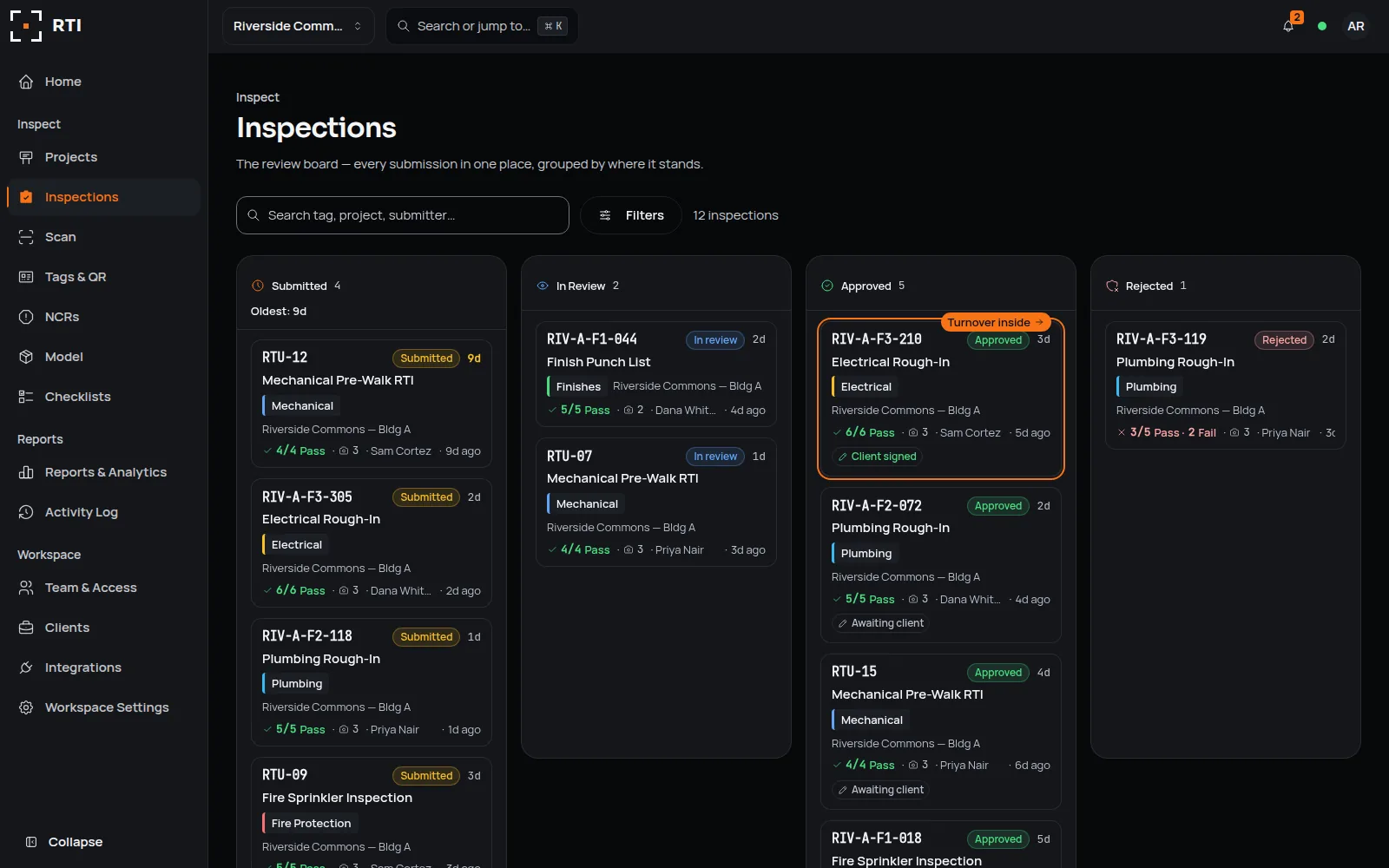
Made for teams that connect RTI to their own tools
- Developers who build reports or dashboards from inspection data
- Data teams who load inspection status into a warehouse on a schedule
- Project controls teams who line inspection status up with their own schedules
- Your reports read the same record the review board shows, not a spreadsheet copied from it.
- The API only reads, so no script can change, approve or delete an inspection.
- A token is shown once, stored as a hash plus the first few characters that tell tokens apart, and can be revoked at any time.
What goes wrong when reports read a copy
Copied exports
Someone exports a file for the weekly report, and it is out of date by the next review.
Shared logins
A script signs in as a person, so its access rises and falls with that person's account.
Write access by accident
A connection that can write can change the very record it was only meant to report on.
With the integration
- Inspection status in your own reports
- Read-only, so the record stays put
- Tokens shown once, revoked anytime
Your system sends a GET with a bearer token to the projects, equipment or inspections endpoint, and RTI answers with that workspace's rows as JSON, newest first, a page at a time.
From the review board to your system
Create a token
Stays in RTI- Who acts
- A workspace admin
- In RTI
- Names a token in Integrations, then Read API. RTI shows it once and keeps a SHA-256 hash of it, with its first few characters to tell tokens apart.
- What RTI sends or reads
- Nothing leaves RTI yet.
- Trigger
- New token, then Create
Call an endpoint
Read by your system- Who acts
- Your system
- In RTI
- RTI checks the token, finds its workspace and counts the call against that token's 120 a minute.
- What RTI sends or reads
- RTI answers with that workspace's projects, tags or inspections as JSON. Inspections can be filtered by project and by status.
- Trigger
- A GET with the token
Page through the results
Read by your system- Who acts
- Your system
- In RTI
- Returns up to 200 rows a call, newest first, or 50 when no limit is set.
- What RTI sends or reads
- When a page comes back full, next_cursor holds the created_at of its last row. Send it back, URL-encoded, as cursor for the rows before it.
- Trigger
- next_cursor
Revoke a token
Stays in RTI- Who acts
- A workspace admin
- In RTI
- Revokes the token in Integrations, then Read API.
- What RTI sends or reads
- The next call with that token gets a 401: Invalid or revoked API token.
- Trigger
- Revoke token
An inspection, as the API returns it
| Field | Example value |
|---|---|
| id | 8f2a… |
| project_ | 2b71… |
| project | Riverside Commons |
| equipment_ | d93c… |
| equipment_ | RIV-A-F3-210 |
| equipment_ | Unit |
| status | approved |
| created_ | 2026-09-12T15:02:44.123456+00:00 |
| submitted_ | 2026-09-12T16:10:03.881204+00:00 |
| reviewed_ | 2026-09-14T18:29:11.517093+00:00 |
| due_ | 2026-09-15T16:10:03.881204+00:00 |
Three moments it handles
Use case 1
A weekly status report
When your weekly report runs, it reads each project's inspections and their status from the API instead of a copied spreadsheet.
Use case 2
Status beside your other data
When your data pipeline runs on its schedule, it reads the newest inspections page by page and loads them beside your cost and schedule data.
Use case 3
Tags for your own tools
When you set up a project in your own system, it reads the project's tags from the equipment endpoint, with each one's QR slug and IFC GlobalId where one is bound.
Setting up the connection
Create a token
A workspace admin opens Integrations, then Read API, names the token for what will use it, and creates it.
Store it once
RTI shows the token once. Keep it in your system's secret store; RTI keeps only a hash, and the first few characters to tell tokens apart.
Send it as a bearer token
Call an endpoint with an Authorization header of Bearer and the token. A missing, wrong or revoked token gets a 401.
Page with the cursor
Set limit up to 200, and pass next_cursor back, URL-encoded, as cursor until it comes back null. It carries a + that must not arrive as a space.
Revoke what you no longer use
Revoke a token in Integrations, then Read API, and the next call with it gets a 401.
What it doesn't do
- It only reads. There is no call that creates, changes, approves or deletes anything.
- It does not return photos, signatures, checklist answers or files. They stay in RTI, where the turnover package is built from them.
- It does not push. To hear about a review as it happens, use webhooks.
- It has no date or changed-since filter. Pages run newest first by created_at, so to catch a later review of an older inspection, read the list again or use webhooks.
- Each token gets 120 requests a minute. Past that, calls get a 429 until the next minute.
- A token sees every project in its workspace. There are no tokens for a single project.
Questions about the read API
6 answers
- What can RTI's read API return?
- Three lists, as JSON: your projects, the tags in a project from the equipment endpoint, and inspections, which you can filter by project and by status: submitted, in_review, approved or rejected. Each inspection carries its tag, project, status, and when it was created, submitted, reviewed and due.
- Can the API change data in RTI?
- No. Every endpoint is a GET. There is no call that creates, edits, approves or deletes a record, so a script with a token can read the workspace but never change it.
- How do I page through results?
- Ask for up to 200 rows with limit; without it you get 50. Rows come newest first. When a page is full, next_cursor holds the created_at of its last row: pass it back, URL-encoded, as cursor to get the rows before it, and stop when next_cursor is null.
- What is the rate limit?
- 120 requests a minute for each token. Past that, RTI answers 429 with a Retry-After header giving the seconds until the next minute, when the call can be sent again.
- How are API tokens stored?
- RTI shows a token once, when it is created, and stores only a SHA-256 hash of it and its first few characters. A copy of the database cannot be used to call the API, and an admin can revoke a token at any time.
- Does the API include photos or signatures?
- No. It returns each record's facts and outcome, not photos, signatures or checklist answers. Those stay in RTI with the tamper-evident record, and go out in the turnover package.
Resources and contact
- See it in the demoThe Integrations screen in the sample workspace. Open the Read API tab.
- Security and the audit trailHow records are stored, chained and kept apart by workspace.
- Turnover packagesWhere the photos and signatures go: the package, with the audit trail attached.
- BIM LinkBind each tag to its model element once; the equipment endpoint returns that IFC GlobalId.
Questions about building on RTI?
Your message goes to the founder, a Certified Building Official, with no sales sequence in between. Support questions go to the support inbox.
See it on a real job.
Tag one area, run one walk, and see the record it leaves behind.
30-day trial · No card required